Variant Framework
 In this release we have removed the color, size, style dimensions that have been in LS One from the beginning and are introducing a new variant framework where the number and names of dimensions is up to the user. Any number of dimensions and attributes can be added.
In this new Variant framework each variant is a separate item that can have as many properties and configurations as a normal item. When creating a variant item the „New retail item dialog“ uses the dimensions configured to create as many items as necessary.
In the retail item list the different types of items are distinguished by the different icons:
-
 Variant header item
 -
 Variant item
 -
 Normal item
Where before the LS One user had to first select a variant item and then select the dimension combination (color, size, style) now all selections are down to an item which can be either a variant item or a normal item. This would be in functionality such as sales prices, discounts, inventory and etc. The Variant header item can be selected in very rare instances as that item cannot be sold directly or be in stock.
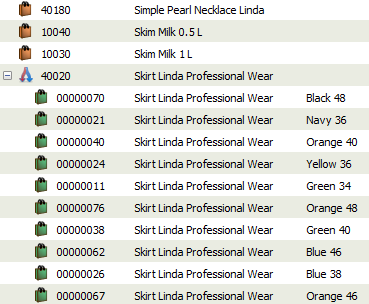
Various functionality was also added to the retail items list in regards to additional search options that for example include variant information.
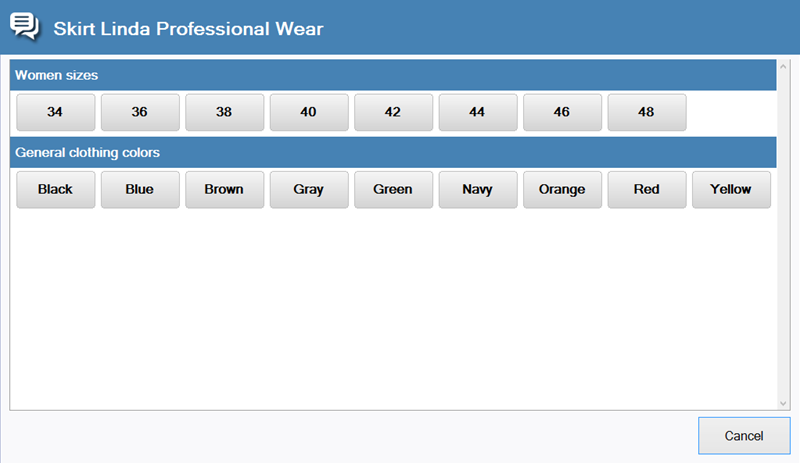
When a Variant header item is sold in the LS One POS an option dialog will be displayed to the cashier where the they must select the dimensions attributes on the item. A variant item can also be sold directly as any other item.
We are very excited about the new opportunities this opens up for LS One especially in fashion.
In the coming days we will be publishing a more detailed description of this functionality on our online help.
| Last updated: | 27th April 2016 |
| Version: | LS One 2016 |

